Built by Data Spec since 1996 • Coming soon to Microsoft Store
๐Ÿ–ฅ๏ธ Free for Windows 10 & 11 โ€” No Ads, No Sign-up

All Your Everyday Programs,
One Click Away.

dsAppLaunch puts the programs you use every day on one clean screen, as a grid of cards. Group them, colour-code them, and start any one with a click — or tick the ones you always open together and start them all at once.

Download Installer (.msi) Microsoft Store — coming soon

Windows 10 or 11, 64-bit. The installer is self-contained: nothing else to install.
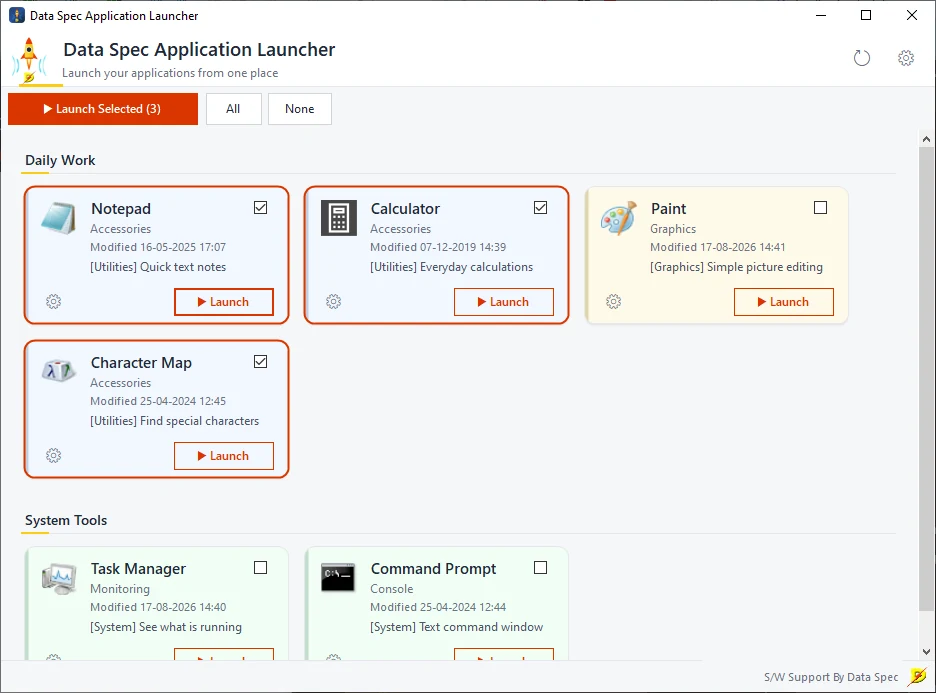
dsAppLaunch main window: cards grouped under Daily Work and System Tools, three ticked, with the Launch Selected (3) button

A Tidy Home for Your Programs

No more hunting through the Start menu or a crowded desktop.

Launch Selected

Tick the programs you open every morning and press one button. They start one after another, in on-screen order, and you get a single note at the end if anything could not start.

Groups and Colours

Put cards under headings like Office or Accounts, set the order inside each group, and colour-code cards with a stripe and soft tint. Each card shows the program's own icon, or one you pick.

Network Shares Welcome

Point cards at programs on a server. The window opens instantly and each card fills in its icon and file date in the background, so a slow or offline server never freezes the launcher.

Drag, Drop, Done

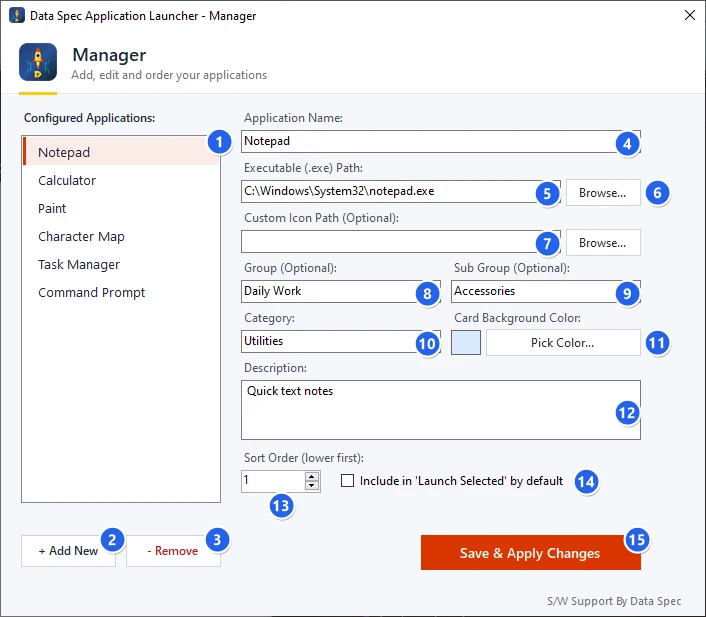
Drag programs or shortcuts from Explorer straight onto the list, or use Browse. Add, edit, reorder and remove everything from one Manager dialog.

Private by Design

No account, no ads, no tracking, and no network connections of its own. Your list is a plain JSON file in your own Windows profile, and it never leaves your computer.

Guides in English and เคนเคฟเค‚เคฆเฅ€

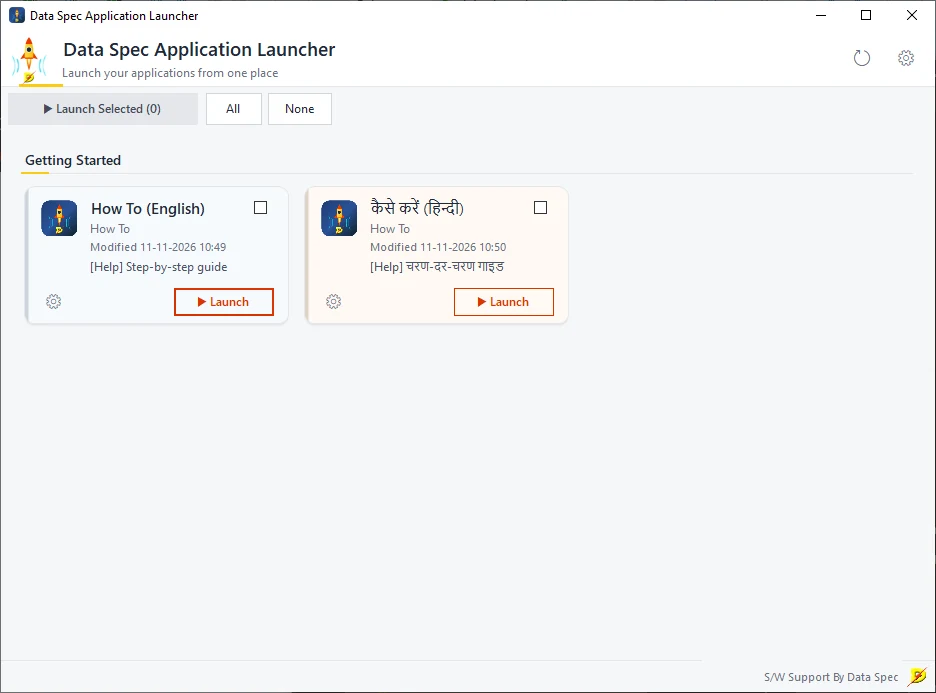
The first time you open it, two how-to cards are waiting: a step-by-step guide in English and one in Hindi. No technical knowledge needed.

See It in Action

Screenshots from the Windows app.

The Manager dialog with fields for name, program path, icon, group, sub group, category, colour, description and sort order
The Manager: every setting for every card in one dialog.
First run: a Getting Started group with How To cards in English and Hindi
First run: how-to guides in English and Hindi are ready to open.

Set Up in Two Minutes

STEP 01

Install

Run the installer, then open Data Spec Application Launcher from the Start menu or desktop.

STEP 02

Add your programs

Click the gear (โš™), drag programs in or use + Add New, then Save & Apply Changes.

STEP 03

Launch

Click Launch on a card, or tick several and press Launch Selected.

๐Ÿ’ธ Free ๐Ÿšซ No Ads ๐Ÿ‘ค No Account ๐Ÿ”’ No Data Collected ๐Ÿ“‚ Open Source (MIT)

Frequently Asked Questions

Tidy Up Your Desktop Today

Free, no ads, no sign-up. Download the installer now; the Microsoft Store version is on its way.

Download Installer (.msi) Microsoft Store — coming soon